A friend of mine has written a couple of good articles about Technological Neutrality, a term that is getting popular among some politics here in Spain (I assume it is also becoming popular worldwide). Check them out (they are in spanish. Click here and here). This concept makes me upset as well as Open Source. To me, they are the same song.
Beeing neutral has nothing to do with justice. There are tons of examples in history that reflect that sometimes beeing neutral is inmoral, specially when you are in front of an unequal battle, like the one we are fighting is.
What the free software community is demmanding from public administrators is justice, not neutrality. How can somebody be neutral between a software solution that do not follows standars, do not allows interoperability with other apps, and another solution that does, allowing other programs to interoperate? How can somebody be neutral when some companies not allow users to choose the tool they want to work with?
Open formats and standars are the only way to ensure technological justice. This has nothing to do with beeing neutral, the way propietary software companies want to sell this concept. This is not a battle between software libre and propietary software. It is a battle that deals with freedom. Nobody should be neutral when freedom of choice is been haunted. I'm Not. That's why I think Technological neutrality is a shame at this point. I want Technological Justice.
Thursday, October 25, 2007
KOffice in schools
Following disccussion taken place at Edu-day in aKademy 2007, here is a more precisely opinion than I expressed there:
Right now a big fight is taking place in market between MS Office and OpenOffice. The appearance of the free software suite and ODF has brought a new interest to a sector long time dominated by the old man. But there are, at least, two more choices:
* KOffice, from the KDE desktop
* GNOME Office suite with gnumeric and Abiword in front.
Both free software products, specially designed for linux desktop, are really mature solutions but, for whatever reason, do not have a good market position.
KOffice is a great suite. It's applications are well integrated and the guys that are working on it are good developers with great ideas. That's what it has moved me to write this, to try to help them to get the attention that other office suites have. KOffice is another example of a good product not having its way because market decisions, that is, users or customers decisions.
What do they have to do in order to attract more attention and more users?
I'm sure they know it but let me make some suggestions anyway.
Linux desktops are being really successful in some sectors but, overall, education is the one where is doing better. I think that, if KOffice team focus even more energy in the education market, they can win a small battle that will help them to get into other sectors, into other battles.
Why should they do that? Why is the education sector a good target for KOffice?
1.- OO and M$ are putting more attention on other sector, specially business.
2.- From an usability point of view, both are hard to use and have tons of features that students never use. This means that a small team of smart developers can fit their needs by doing things different. KOffice developers have those skills and the resources needed to become relevant in this new market.
3.- MSOffice and Openoffice are heavy apps. In many schools only old computers are available, so performance problems come along. This has been going worse lately. KDE + KOffice is a killer solution from a performance point of view.
4.- They (M$ and OO) try to be a "one for all" type of app. In education it is much better to use one app for one purpose. Specially with little kids. GNOME has done a good job on this and KOffice has good technical points to achieve it. Only heavy integration with other apps and between office apps justify that politic. OO has a very weak point here, integrating with desktops. M$ only integrates with M$ products the way KDE or GNOME can do it.
5.- Most of the users (specially teachers) do not use anything but the word processor from a office suite. So for most of them, a office suite is not needed. Politics and non experienced (in computers) teachers think they do. Integration with the desktop and other apps is a solution for both of them. In one side, we give teachers what they want. In other hand, we make student use it with apps they like.
6.- Kids use drawing apps. M$ do not have any good one. Integration with the word processor is needed. KOffice is doing a good job on this.
7.- KOffice can be integrated with other apps and desktop features that students love, like IM clients, audio and video players, web services, etc. KOffice can become fun to use. Users see Office suites as boring. They are.
8.- The visual design is not adapted for kids in OO and M$. KOffice can outstand both, specially with the realease of KDE4.
9.- Internationalisation is a key feature for schools that M$ do not have.
10.- First world governments are putting money in linux for schools and they believe (wrongly, in my opinion) that office suites are a key app to teach. Being competitive in this sector will bring a huge attention to this project and to KDE in general.
11.- It would be a good reason for politics to decide to switch from Windows to KDE, avoiding including OO for many profiles, specially students under 12. It would show how powerful linux(and KDE) is in adapting itself to special needs.
12.- KDE is getting popular in schools. KOffice can take advantage of that.
13.- KOffice can have different interfaces for different profiles without having to rewrite the code. An interface for little kids would be an outstanding first step.
14.- KOffice is more suitable to get people involved in its development since is part of KDE project.
15.- Focusing on education do not means to abandon the actual path. I think that, if it is done the right way, putting effort on education would attract more energy into the KOffice team, so the total manpower can be balanced. If that attraction do not happens, the effort is worth it anyway because of the increasing of KOffice users in schools.
16.- It opens a new unexplored market, that means innovation. Innovations is equal to excitement, that means more energy added into KDE.
After my experience in mEDUXa, this is really clear to me. I know people from other edu projects agree, like the guys from Skolelinux. Education is a big opportunity for KOffice. If they (we) don't go for it, somebody else will. It is just a matter of time.


Big deployments of desktops and Kiosk Mode
Another item included in Edu-day discussions was related of the importance of the kiosk mode. I've written this while travellling and haven't checked grammatical errors. I'll do it the following days. But today it has been published info about the aKademy 2007 and I think it is the right day to publish this. Sorry for my english.
The kiosk mode is a key feature in KDE for big deployment because many reasons. This post go through two of them:
1.- Reduce the amount of data to transmit for updating desktops.
2.- Allows a systematic method of setting profiles for users so costs are reduced.
All the features of the desktop and the kde apps can be controlled in one directory, in a few number of .txt files under /usr directory. This means that, by changing a really few light archives, we can control desktop configurations and set different profiles with heavy customisation, that the user cannot change. This is basically what kiosk mode allows us to do. When we talk about thousands of computer with different profiles, like in mEDUXa (35,000 with 5 profiles each), this is a big issue.
When we talk about homogeneous networks or deployments, we do not refer to the network itself, specially the bandwith. This usually depends on geographical factors hard to control, so its heterogeneous. Traditionally this has been a huge problem in many places. The Canary Islands are no exception. Not just because they are seven islands in the middle of the Atlantic sea, but because they are volcanic, so there are many mountains.
Lets resolve a simple math problem. If I have to change a configuration in a desktop that is placed in user space, in a .txt file of 2 KB for example, it means that, if I have 10,000 users in 100 schools (100 users per school), I should send to school servers 2x100=200 KB through my network, and then make an update of 2x100= 200 KB in each school (if some users are able to log in with different profiles, the number grows) through its LAN. That is a total of 200x100=20,000 KB, something around 19.5 MB.
If the configuration change means 3 archives of 30 KB each, placed on the user space, and we have 1100 schools, 300,000 users and 5 profiles, you add the problem of bandwith limitations (we have ADSL of different bandwith and many satellite connections in many schools) to this equation, and then, the enormous cost of sending technicians from one island to another one... sleeping well gets harder. Kiosk mode makes a difference.
First of all, kiosk mode is set by text files, really light. By configuring features in a centraliced way, you only have to make one change (under /usr) per profile in a machine (if it is set locally), and not per user. This is a huge reduction on the amount of data that needs to be updated, so the control of that process and the possible point of failure are drastically reduced.
By setting the features configurations under /usr/local/share, we avoid user from changing them.
Lets take a look at firefox, for example. If you use a proxy to navigate, this browser doesn't let you place that feature in the system space, so you cannot block it from being manipulated by users. Since the browser is used almost every day many times in a computer lab of every school, we can say being optimistic, that at least, once each two days the teacher is going to have a problem. He is going to tell the school coordinator about it so he/she will send the report to the centralised support department, that a user cannot navigate, lets say, once each two weeks. The technician will take about 5 minutes to figure out if it is a network problem by checking it, connect to the machine by ssh, check the browser, go to the user profile and verify the proxy configuration. 5 minutes a week per school means 5x1100=5500 minutes, that is 12 working days (8 hours each). If the cost of an hour is 30 €, for example, that means about 2700 € per every two weeks, 5400 €/month. If the computer lab is used 8 months per scholar year, not following the kiosk mode in this case cost about.... 43,000 €
Of course you need to set a solution for that before the disaster takes place. So you can make all kinds of hacks to solve a structural problem of the app or go directly and substitute it, if there is any available, by another one with the same features, that can be integrated in kiosk mode (KDE app). If there is any, you pay somebody to fix it (hopefully the developer) or.....kill yourself. Or even worse get killed by teachers or students because you don't solve the problem.
Of course this is not a real problem. They can be even worse. But it shows clearly how important is for big deployments that all desktop and apps features can be configured through the kiosk mode and why it is such a relevant argument for electing KDE. This can help people understand why windows has such a huge cost of support per machineper year.
But kiosk mode is not just a feature, it is an agreement of a community to follow some development rules that allow other people to customice the desktop and apps in a systematic way, simplifying the action of setting and changing configurations and avoiding failures because of users actions. It is even more, it makes possible to extend the concept of scalability to the desktop, by allowing to offer different profiles in the same machine without multiplying the points of failure in a linear way. This means that in the future we can achieve the idea of a student using different profiles during his scholar life but having the same user space, saving all the data and customisations he has made in school and taking them home. Only with kiosk mode is possible to think in a profile for the math class, another one for chemistry, etc. for each student. Each of them with requirements established by teachers, implemented centrally by technicians and deployed in a short period of time.
So I have two important suggestions for KDE developers.
1.- Make all your features configurable using kiosk mode.
2.- Document them. So projects like mEDUXa can apply them and users can take advantage of them.
mEDUXa. 2.0... a wellcome and a goodbye
Yesterday, friday 21 of september of 2007, during the II Jornadas de Software Libre Conference, that took place in La Laguna's college, Tenerife, Canary Islands (with the presence of J. Riddell, A. Seigo, R. Dale and Alan Runyan, among others), the mEDUXa 2.0 version based on Kubuntu Fiesty Fawn has been presented.
The Educational Department of the Canary Island Goverment have used most of the job done for mEDUXa 1.2 version and update the distro. They are also doing a Live CD. I have no more info so I cannot inform about it.
They have stopped the deployment of the 1.2 version (with Inves computers) and in a few weeks are going to begin the deployment of the new version in new computers (from another vendor with 2 GB of ram). So mEDUXa 1.2 and the new 2.0 version are going to live together for a while (3 or 4 years). Right now 250 schools have mEDUXa 1.2, and another 100 will have mEDUXa 2.0 by the end of the year.
So the Canary Island Gov. is going forward with mEDUXa and have plans to improve it the following years. These are good news. They are also including free software apps in the Windows Desktop.
For me and Grupo CPD this is is a goodbye. We are not going to be involved in mEDUXa anymore since the Medusa project haven't contract us for the 2.0 version. Fujitsu and some teachers are doing the job.
First of all, we want to thank all KDE community for their support, specially to the kde-edu team. We gonna keep involved in this community project. We love it. Thanks also to Kubuntu guys (specially J. Riddell), Canonical and Kubuntu community for the awesome job you guys are doing. Thanks to Debian-Edu community, CGA people from Andalucía and the teachers, developers and technicians that have collaborated with us the last 3 years. For the team I've been coordinating it has been a pleasure work in such a project and meet so many smart guys.
Personally this experience have changed my life forever. I want to get involved in more projects like this one. Software Libre makes the difference. Thanks
In following posts I'm going to write about strategies to improve mEDUXa and other educational linux distributions.
Very special thanks to mEDUXa's team. It been a great pleasure to work with you.
KDE-Edu meeting in Paris 1st and 2nd of december
The KDE-Edu team is having a meeting in Paris on the 1st and 2nd of december 2007 to decide strategies for KDE 4.1. This is a sign of the maturity of this project. If you are involved in teaching and software, don't miss that meeting. Many good developers are involved in the KDE-Edu team. Applications like kig, kalzium, Kgeography, etc. are developed by these guys.
Stay tuned for the conclusions.
Stay tuned for the conclusions.
This blog comes back again
The tool I have my blog in, b2evo is already obsolete. The version I have is old. I have now more hits than I've never expected and the ADSL line of my new office gets busy sometimes, so I decided to use Blogger again. The entries I'll write in english will be posted here. The ones in spanish are going to be at my old blog for a while. Lets see how this new configuration works.
Tuesday, June 20, 2006
I change the blog platform and URL
I change this blog to this URL: http://agustin.ejerciciosresueltos.com
Bye
Bye
Thursday, June 15, 2006
Campamento tecnológico
Hace un par de semanas hemos participado en dos campamentos tecnológicos organizados por el Cabildo de Tenerife.Puedes leer más información al respecto en la web del Grupo CPD. Me gustaría comentar un par de conclusiones que han extraido las docentes de las actividades de informática. Estas y otras conclusiones se han incluido en el informe que entregaremos al organizador.
Ha sido muy llamativa la diferencia entre las participantes españolas e inglesas en lo que a nivel de conocimientos de informática se refiere. No sólo estaban más familiarizadas con el entorno, sino que sus conocimientos de diversas herramientas eran superiores. Las participantes tenían entre 14 y 16 años. Las participantes inglesas habían aprendido en la escuela a usar el ordenador en asignaturas obligatorias. Contrasta esto con el hecho de que el Gobierno de Canarias va a implantar ahora aulas en los colegios de primaria y que la asignatura de informática no es obligatoria en algunos cursos de la ESO. El retraso no es sólo una cuestión de equipamiento, tambie se reflejaba claramente en aspectos sociales o culturales. Mientras que las participantes españolas tenían como principal actividad el uso de lamensajería instantánea, las chicas inglesas demostraban otras motivaciones adicionales relacionadas con internet.
La respuesta general a la actividad en la que creaban su propio blog fue muy buena. Creo que es más interesante para los chicos de esas edades aprender este tipo de cosas que el uso del Word o el Excel. Aprendieron tambien a usar el wiki (Mediawiki). El objetivo es que se enfrenten en un futuro próximo a wikipedia, no sólo como lectores, sino como redactores o correctores. La posibilidad de participar activamente en la generación de contenidos es una motivación que no tienen a la hora de aprender las herramientas básicas que se imparten en nuestra enseñanza obligatoria. Los blogs y los wikis deberían ser, bajo mi punto de vista, las primeras herramientas a aprender por los estudiantes.
Los jóvenes responden también de manera favorables a herramientas relacionadas con el audio y la imagen. En otra de las actividades, las participantes sacaron fotos y las colgaron en galerías de internet (Flirck), en el blog o en el wiki. En el Gimp aprendieron a cambiar el formato de las imágenes y a realizar algunas tareas de retoque muy simples. En definitiva, se trataba de que se divirtieran mientras aprendían. La experiencia demuestra que es posible compaginar diversión y enseñanza si se posee un amplio control del medio por parte del docente y la infraestructura adecuada. Fue una pena que alguno de los docentes de los centros de las alumnas locales no asistieran a estas actividades. Les hubiera servido de gran ayuda.
mEDUXa Beta product is out
This week we have finished the beta product of mEDUXa.
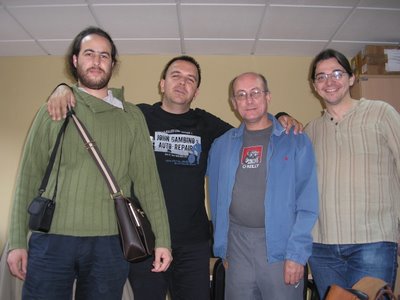
Here you can see the team that has been working lately on mEDUXa. From right to left you can see:
Esteban Manchado: Debian developer and a RoR expert
Richard Dale: Kde e.V. member and ruby expert
Agustín Benito: coordinator of the companies that are developing mEDUXa (myself).
Noel Torres: system administrator
The team is also composed by Enrique Zanardi (Debian developer), Pedro Gracia (cluster expert) and Luis Fajardo (lawyer expert in software licences and patents). More people is contributing with contents.
mEDUXa is presented with three basic profiles. The one for primary school students, another one for secondary school students and a teacher profile. In fact, the only differece between the last two profiles is tha capacity teachers have to configure printers or to install applicattions.
 We have found some problems with the new beta version of VMWare (we will use on every school's server) that we are trying to deal with. We are also finishing the Kmenu of every profile defined. This week we gonna finish the document that describes the apps included on mEDUXa and, hopefully, make advances on some minor bugs we have. We also have to face some changes on the central server configuration. Some teachers already have the beta product so we gonna recieve some feed back from them. Let's see what happens. I think they gonna like it. We also will present these days the results of the tests we have been doing last couple of weeks.
I would like to present mEDUXa on Akademy 2006. Last year we made a conference about our plans. This year we want to show it. Call for papers is open so let's see if we write one.
The next step is to recieve feed back from some teachers thata work as advisors for the Canarian Educational department. Also we gonna do some tests on diferent schools before finishing our job. After that we gonna design the web and the support structure. As you can imagine, there's a lot of job to do. This is only our first stop,but is the big one.
Anyway, we still have some fixing to do in mEDUXa. Firefox have to be customized in order to avoid students from changing the network configuration or its default URL. We still have some minor problems with the icon positions of the devices.
We gonna add two students to the project.They gonna do the last year's project about mEDUXa. I think is a good way to involve ULL college with mEDUXa. Most of the job we are doing can be used by college students. I remind you that everything we are doing is GPL and is going to be on a public repository once it is finished.
Here you can see the team that has been working lately on mEDUXa. From right to left you can see:
Esteban Manchado: Debian developer and a RoR expert
Richard Dale: Kde e.V. member and ruby expert
Agustín Benito: coordinator of the companies that are developing mEDUXa (myself).
Noel Torres: system administrator
The team is also composed by Enrique Zanardi (Debian developer), Pedro Gracia (cluster expert) and Luis Fajardo (lawyer expert in software licences and patents). More people is contributing with contents.
mEDUXa is presented with three basic profiles. The one for primary school students, another one for secondary school students and a teacher profile. In fact, the only differece between the last two profiles is tha capacity teachers have to configure printers or to install applicattions.
 We have found some problems with the new beta version of VMWare (we will use on every school's server) that we are trying to deal with. We are also finishing the Kmenu of every profile defined. This week we gonna finish the document that describes the apps included on mEDUXa and, hopefully, make advances on some minor bugs we have. We also have to face some changes on the central server configuration. Some teachers already have the beta product so we gonna recieve some feed back from them. Let's see what happens. I think they gonna like it. We also will present these days the results of the tests we have been doing last couple of weeks.
I would like to present mEDUXa on Akademy 2006. Last year we made a conference about our plans. This year we want to show it. Call for papers is open so let's see if we write one.
The next step is to recieve feed back from some teachers thata work as advisors for the Canarian Educational department. Also we gonna do some tests on diferent schools before finishing our job. After that we gonna design the web and the support structure. As you can imagine, there's a lot of job to do. This is only our first stop,but is the big one.
Anyway, we still have some fixing to do in mEDUXa. Firefox have to be customized in order to avoid students from changing the network configuration or its default URL. We still have some minor problems with the icon positions of the devices.
We gonna add two students to the project.They gonna do the last year's project about mEDUXa. I think is a good way to involve ULL college with mEDUXa. Most of the job we are doing can be used by college students. I remind you that everything we are doing is GPL and is going to be on a public repository once it is finished.
Subscribe to:
Posts (Atom)